Tips and tricks
Just some tips and tricks in no particular order. I just added anything I could think of or was told of. Browse them and perhaps you'll find something useful.
I'd love help growing this list. It's honestly hard for me to tell what's obvious and what isn't, so if you know a trick that belongs here, come share it on Discord .
Shift + hover to peek at definitions
Hold Shift and hover on the word to open the dictionary without clicking through links.
On a parsed webpage, clicking a word opens the dictionary popup, but it also clicks whatever is underneath. If the word sits inside a button or a link, you'll end up navigating away instead of seeing the definition. On desktop the fix is to hold Shift and hover over the word: the popup opens without the click going through.
On mobile there's a rough equivalent now. Open the browser menu and turn on Lock links. It'll do its best to stop taps from following links so you can look words up in peace. It's best effort, so don't expect it to catch every case.
Move the subtitles vertically
Click and drag (Ctrl+click) to reposition subtitles vertically.
You can click and drag (ctrl+click) to move the subtitles vertically. On mobile, just touch and drag instead.
Paste image in the mining editor dialog
Copy an image, then Ctrl+V anywhere in the mining editor to attach it.
One pretty hidden feature is that you can paste an image in the mining editor dialog if you have it in your clipboard. Click anywhere in the dialog and Ctrl+V. On mobile, the trick also works, but because there's no physical keyboard, you'll have to be inside a text field, like the translation one, for example, and paste the image there. This should work.
Reset all your words
No reset button exists, but you can re-import all your words as unknown.
So, officially there's no such button. But you can re-import as unknown all your words. Here's how you can do it:
- Click on your word counter in the sidebar; it will redirect you to /stats/words/all.
- Ctrl+A and Ctrl+C
- Account > Import
- Go to the Text tab.
- Ctrl+V
- Choose Lemma as in and Import as Unknown.
There's no undo button, so be careful.
Temporarily show all words underline
Press Shift three times in quick succession to toggle every word's underline.
While I personally never use this, I want to point out that this exists. The keyboard command is pressing shift three times in quick succession. It acts as a toggle, so to revert you have to press shift thrice once more. If you want to keep this enabled at all times, you can do so in the settings.

Spend time exploring the settings
There's a lot in the settings, so much that I had to build a search bar for it. Consider taking time to explore them :)
Just thought it was worth mentioning to spend time exploring the settings; there's a lot of stuff, to the point there's a search bar.
Change the font
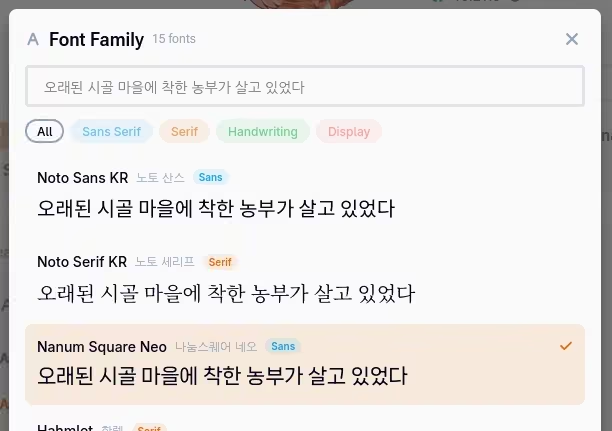
Did you know that you could change the fonts for both the reader and subtitles ?
There's a setting to change the font, both for the reader and for the subtitles. Worth a try if the default doesn't sit right with you, or if you just want something easier on the eyes.
Long-press a sentence for more actions
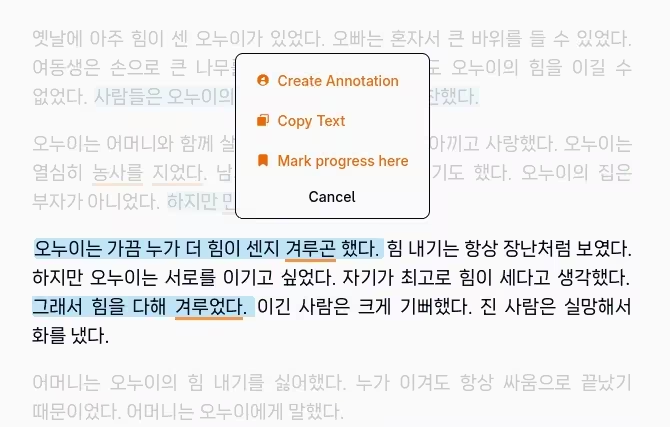
In the reader, you can do a long press on any word to highlight the sentence, copy it, or set your reading progress.
In the reader, press and hold any sentence to open an action menu. Works with a mouse on desktop and with your finger on mobile. From there you can highlight the sentence in one of six colors, copy either the sentence or the whole block, or set your reading progress to that spot so you can pick up there next time. While you're highlighting, the arrow buttons stretch the selection over the neighboring sentences. And if a sentence is already highlighted, the same menu is where you remove it.
Double-tap the edge to turn pages on mobile
On mobile, double-tap the left or right margin of the reader to flip to the previous or next page.
Instead of reaching for the page buttons, double-tap the empty margin on the side of the page: left goes back, right goes forward. The first tap highlights the edge so you know it registered.
Customize the squares in the sidebar
The little squares in the sidebar menu can be customized in Appearance > Sidebar Stats.
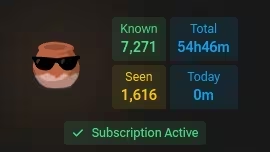
Some of the small squares at the top of the sidebar menu can be toggled on/off. Head to Appearance > Sidebar Stats in the settings and you can turn each one on or off: seen words count, total study time, today's study time. Keep the ones you actually want to look at and hide the rest.
Set a word's status with 1/2/3/4
Hover a word and press 1, 2, 3, or 4 to mark it unknown, seen, known, or hidden without clicking anything.
It's covered on the word statuses page, but it's worth repeating because it's such a time-saver. Hover over any word and tap a number: 1 for unknown, 2 for seen, 3 for known, 4 for hidden. No clicking, no popup, just hover and press.
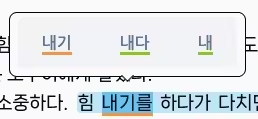
One thing to know: some words have more than one possible lemma. When that happens, the shortcut can't be sure which one you mean, so instead of guessing it asks you to pick the right one for this sentence. More on that in Handling ambiguity.
Export your word statuses
Click the word counter in the sidebar, then hit export. Want the full history instead? Switch to the History tab on that same page and export from there. You get a CSV.
Click your word counter in the sidebar to open your full word list, then hit export. If you'd rather have the full history, switch to the History tab on that same page and export from there.
Either way you get a plain CSV, so you can open it in Excel or Google Sheets and do whatever you want with it.
Set your own cover for a book
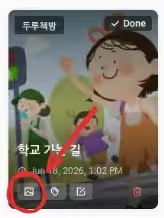
On the Documents page, click an item and hit the little thumbnail button to upload your own cover image.
Don't like the cover a document came with, or it doesn't have one? Open the Documents page, click the item and look for the small thumbnail button. That opens an editor where you can drop in or paste your own image and crop it to fit. Nice for giving your custom documents a proper cover.
Save documents to read offline
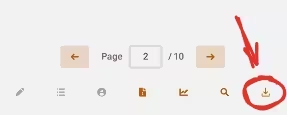
On the native mobile apps, open a document and use the download button at the bottom to keep it available offline.
If you're on the Android or iOS app, you can save a document for offline reading. Open the document, scroll to the bottom, and tap the download button. After that it stays available even with no connection.
An easy way to get a feel for it: flip airplane mode on and off. Toggle it on, open your saved document, and you'll see it still works. Handy for flights, subways, or anywhere the signal drops.
Browse collections for hand-picked content
Collections are hand-made lists of content, a good way to dig up gems the algorithm might bury. Find them under the Collections tab in Discover.
The recommendation system is mostly automatic, but Collections is the human side of it. You'll find it as a tab on the Discover page. A collection is just a list of items someone put together by hand, around a theme, a difficulty, a show, whatever they felt like grouping. It's a nice way to find good stuff that you might never stumble on by filtering alone.
You can star the ones you like so they're easy to come back to.
Customize your home page
Click the gear button at the top right of the Home page to rearrange, hide, or add tiles. Not all of them are shown by default.
Your Home page is made of tiles, and you can lay them out however you like. Click the gear button in the top-right corner to enter edit mode. From there you can drag tiles to reorder them, remove the ones you don't care about with the red X, and bring in more with the Add tile button at the bottom.
That last bit is easy to miss: not every tile is on by default. So if you expected something and don't see it, it's probably sitting in the Add tile list. Press Done when you're happy with the layout.
Filter the subtitle browser to 1T lines
Turn on the 1T Filter in the subtitle browser to show only lines with a single new word, the easiest ones to learn from.
A "1T" line (1 Target) is a sentence where you already know every word except one. Those are the sweet spot for learning: the rest of the sentence gives you enough context to pick up that one new word.
The subtitle browser has a 1T Filter toggle. Flip it on and the list trims down to just those lines, so you can jump straight to the sentences worth mining instead of scrolling past ones that are too easy or too hard. What counts as a target (unknown only, or unknown and seen) is up to you in the settings.
Check the community insights
Aggregated stats from everyone using Kimchi Reader, under Stats > Insights. If you love stats, you def should check it out.
The Community Insights page pulls together aggregated data from everyone using Kimchi Reader. You get live counters ticking up, the content people pour the most hours into, and a look at how well-known each word tends to be by its frequency rank.
To get there, open your Stats and click the Insights tab in the row at the top. There's also a shortcut button up in the Discover toolbar, right next to Help.
Read the dictionary in a language other than English
krdict definitions come in 11 languages, not just English. Pick yours in Dictionary Language > Definition language. Only the definitions change, the app stays in English.
국립국어원 translated krdict into eleven languages, so if English isn't your first language, go grab yours in Dictionary Language > Definition language. Just to be clear, it only swaps the krdict definitions. The app, the settings, this manual, the support I give, all of that stays in English and will stay that way, I'm one guy. Some senses were never translated so those stay English too, and opendict is Korean only, nothing changes there.
A softer way into monolingual
Turn on "Also show Korean definition" to get krdict's Korean under your own. It's a much smaller and simpler dictionary than opendict, so it's an easier first step into monolingual.
Dictionary Language > Also show Korean definition adds krdict's Korean definition under your own. Good if you want to go monolingual but opendict is still too hard as their entries are usually pretty huge, krdict is much smaller and simpler. Both are on screen, so you can read the Korean and fall back on your language when needed.
Review a random seen word with the word of the day tile
You can configure the word of the day tile on your home page to only show words that are on the seen status.
By default the word of the day gives you a word you don't know yet. Click the gear on the tile and you can set it to seen only, so every day it hands you a random word you've already met. Kinda a slow Anki, one card a day :)